What Is Web Development? A Plain-Language Guide for Business Owners
You want a website for your business. You have heard terms like “web design” and “web development” thrown around. Perhaps a vendor quoted you for “full-stack development” or a “responsive WordPress build.” And you are not entirely sure what any of it means — or what you actually need.
This guide is for you. It explains web development in plain language: what it is, how it differs from web design, what a typical website project involves, and what questions you should ask before engaging anyone to build your website.
No technical background required.
This is Cluster C1 in the GA Digital Solutions Website Design & Development series. For the full overview of what GA Digital offers, see the Website Design & Development Services pillar page.
What Is Web Development?
Web development is the technical process of building a website. It is the code, the platform, the database, and all the behind-the-scenes work that makes a website function.
If web design is what a website looks like — the colours, typography, layout, and visual identity — then web development is what makes it work. A website with beautiful design but poor development will load slowly, break on mobile devices, fail on certain browsers, or return errors when a form is submitted.
Both are necessary. Neither is sufficient alone.
| Web Design | Web Development |
|---|---|
| Visual look and feel | Technical functionality |
| Colours, fonts, layout, imagery | Code, database, integrations |
| User experience and navigation | Speed, security, responsiveness |
| Brand identity expression | Forms, payments, booking systems |
| Produces: design mockups | Produces: working website |
The Three Layers of a Website
Every website — no matter how simple or complex — is built from three technical layers. Understanding these helps you have more informed conversations with developers and agencies.
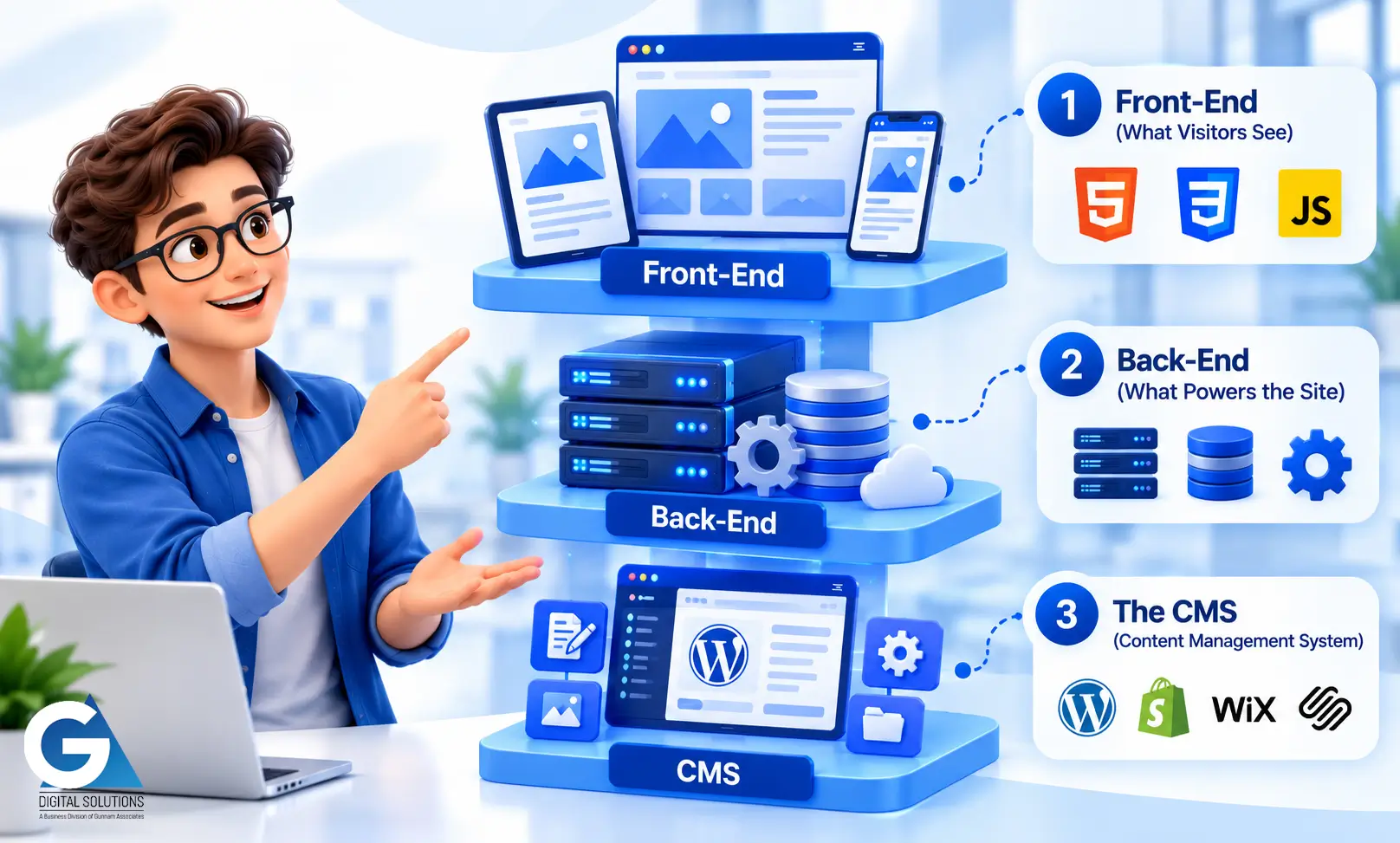
1. Front-End (What Visitors See)
The front-end is everything a visitor sees and interacts with in their browser. It is built using HTML (structure), CSS (visual styling), and JavaScript (interactive behaviour). When a developer talks about “responsive design,” they mean writing front-end code that adapts the layout for different screen sizes — desktop, tablet, and mobile.
Front-end developers focus on visual accuracy (does the build match the design?), performance (does it load quickly?), and accessibility (can all users interact with it?).
2. Back-End (What Powers the Site)
The back-end is the server-side layer — the code and database that run behind the scenes. For a brochure website, the back-end may be minimal (a CMS storing page content). For an e-commerce store or booking system, it is substantial: managing products, orders, payments, user accounts, and data.
Most Indian business websites are built on WordPress, which handles the back-end through a combination of its core platform and plugins. Custom web applications require dedicated back-end development.
3. The CMS (Content Management System)
The CMS is the control panel that allows you — the business owner — to update your website without writing code. WordPress is the most widely used CMS globally and the most common choice for Indian business websites. Other options include Shopify (for e-commerce), Wix, and Squarespace.
A well-configured CMS means your team can update text, add blog posts, change images, and manage content independently. A poorly configured one means calling the developer for every small change.
What Does a Website Development Project Actually Involve?
A professional website project has several phases. Here is what each involves and what you, as the client, contribute to each stage.
| Phase | What happens |
|---|---|
| Discovery | Agency learns your business, audience, and goals. You provide a brief, share existing materials, and describe what you want the website to achieve. |
| Information Architecture | Pages, structure, and navigation are defined. Determines what pages exist and how visitors move through the site. |
| Design | Visual mockups created for key pages. You review and provide feedback. Typically two rounds of revisions. |
| Development | Approved designs are built into a working website. Platform configured, forms integrated, CMS set up, speed optimised. |
| Testing | Cross-device and cross-browser testing. Form functionality checked. Performance benchmarked. Any final issues resolved. |
| Launch | Website goes live. Credentials handed over. CMS training provided. Maintenance plan recommended. |
The phase most business owners underestimate: content. Text, images, and other page content must be provided by the client (or sourced separately). Most project delays happen because content is not ready when development begins. Plan for this early.
What Technologies Are Used to Build Websites?
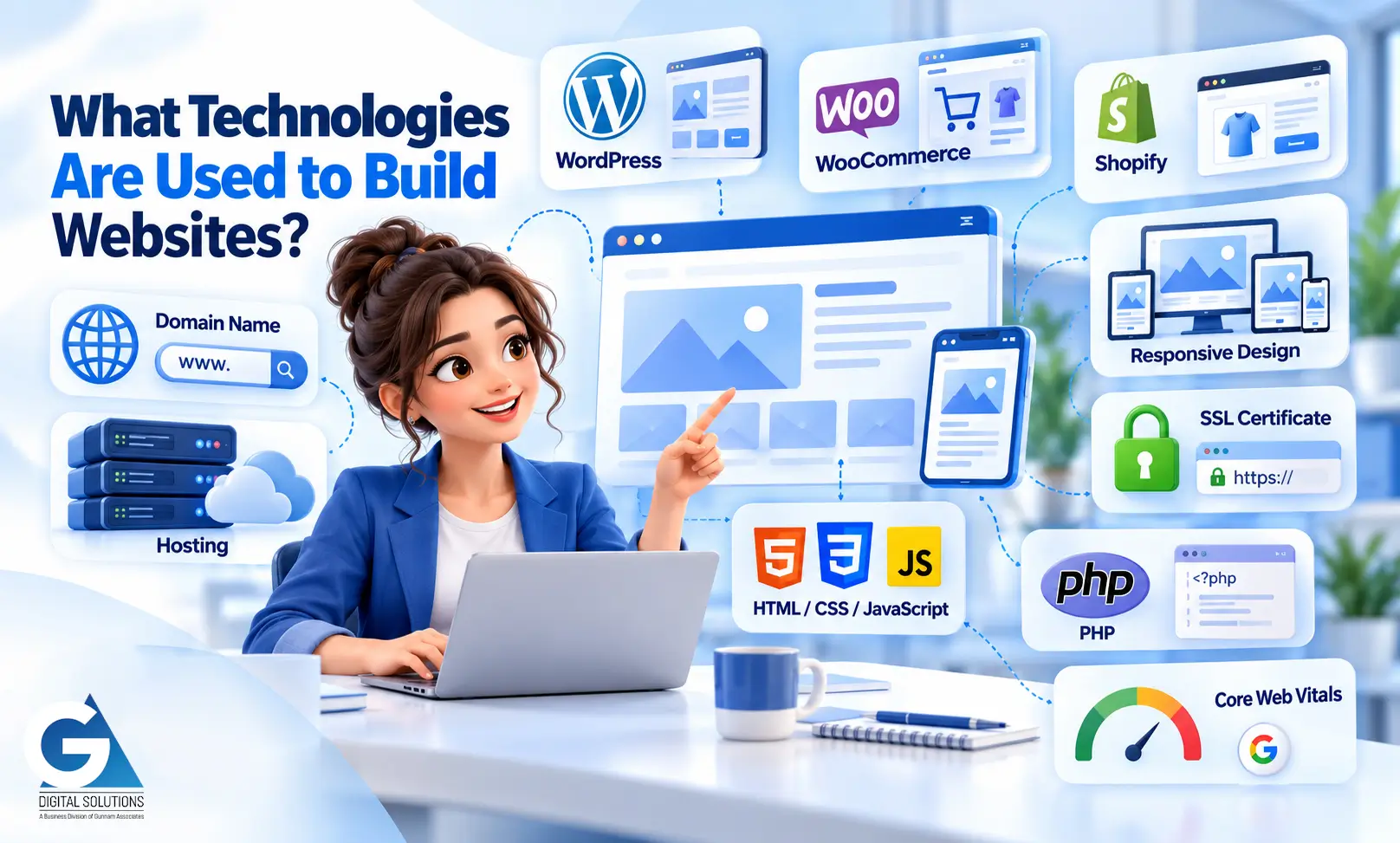
You do not need to understand the technical details, but familiarity with the most common terms helps you evaluate vendor proposals and understand what you are being quoted for.
| Term | What it means in plain language |
|---|---|
| WordPress | The most widely used website platform (CMS) in the world. Powers the majority of Indian business websites. Good for brochure sites, lead-gen, blogs, and e-commerce (via WooCommerce). |
| WooCommerce | An e-commerce plugin for WordPress. Turns a WordPress site into an online store. Most popular e-commerce solution in India. |
| Shopify | A dedicated e-commerce platform. Easier to use than WooCommerce but less flexible and higher ongoing cost. Good for product-focused businesses. |
| Responsive Design | A website that adapts its layout for different screen sizes. A responsive website looks and works well on mobile, tablet, and desktop. Not optional in 2026. |
| SSL Certificate | The technical mechanism behind the padlock in your browser address bar. Encrypts data between visitor and server. Required for any site collecting form data. Shown as https:// in the URL. |
| Hosting | The service that stores your website files on a server and makes them accessible on the internet. Separate from the domain name (your web address). |
| Domain Name | Your website address (e.g. gadigitalsolutions.com). Registered separately from hosting. Should always be in your name, not your developer’s. |
| HTML / CSS / JavaScript | The three core languages of the web. HTML = structure, CSS = styling, JavaScript = interactivity. You do not need to understand these — just know they are what every website is made of. |
| PHP | The server-side programming language that WordPress runs on. Kept up to date as part of website maintenance. |
| Core Web Vitals | Google’s three key performance metrics (LCP, INP, CLS) that measure how fast and stable a page is for users. Direct Google ranking factor. |
What Happens After a Website Is Built?
This is the question most business owners do not ask until after launch — and it is one of the most important.
A website is not a finished product at launch. The software it runs on requires ongoing updates. The security threats it faces evolve continuously. Its performance degrades without active management. Without maintenance, a website that was excellent at launch will deteriorate within 12–18 months.
Website maintenance is a separate, ongoing service — distinct from the development project — that covers software updates, security monitoring, backups, performance checks, and regular reporting.
Ask any web development agency: “What maintenance do you recommend after launch, and what does that involve?” A professional agency should have a clear answer. If the response is vague, that tells you something important about their long-term commitment to client success.
30 minutes. No obligation. We assess your needs and give you an honest view of what a website project would involve for your specific business.
Summary
Web development is the technical process of building a website — the code, platform, and functionality that makes it work. Web design is what it looks like. Both are necessary for a website that performs well for your business.
A professional website project moves through discovery, information architecture, design, development, testing, and launch. The most important contribution you make as a client is a clear brief and timely content. The most important question to ask any agency is what they recommend for ongoing maintenance after launch.
If you are ready to start a conversation about your website, GA Digital Solutions offers a free initial consultation. No technical knowledge required — just a clear idea of what you want your website to do for your business.
Comments
Post a Comment